
Creative Juices Design
  • Home
  • Logos
  • Websites
    • Website Design Service
    • Domain Name Search
    • Web Hosting
    • Custom Video Productions
  • Design Services
    • Book Design
    • Brochure Design
    • Stationery
    • Postcards
    • Ad Design
    • CD Design
    • Writing and Editing
    • Displays and Signage
    • Marketing
    • Printing
    • One on One Design Help
    • FAQs
    • Web Site Terms and Conditions of Use and Privacy Policy
  • About
  • Blog
  • Contact

Archive for September 2010

28 Sep

Todo is Now in the Clouds

Having just written about Appigo Sync version 1.2.0 I feel I must also talk a bit about today’s update to version 1.2.1.

This new update occurred just a day or so after the previous update. This time I had no problems with duplicate content or the inability to sync. Everything worked fine.

Now that the iPhone update is optimized for iOS4, it remains open unless you close it in the multi-task bar. Because of this, it does not automatically sync after initially opening unless you manually press the sync button.

New Todo Online Service

For $19.99 per year, Appigo is offering Todo Online “Over-the-Air-Cloud-Sync”. What this does is sync your todos, projects, checklists, alerts, etc. with an online cloud service. This means you do not have to sync your Todo app with your computer and Appigo Sync. So you can sync your iPhone, iPad, iPod Touch and iCal with the online service, no matter where you are, and even view your todos on any computer. And it’s always up to date.

Of course, if you have daily access to your “base” computer with your iThings, and you’re the only one using your iStuff, I’m not sure what the benefit is over the free Appigo Sync software, other than having a (hopefully) reliable backup.

What is not clear yet, is if this new Todo Online service will sync up with the new iCal MobileMe when it comes out of beta. This is where iCal content is only stored online and not on your computer. We shall see.
Apps iPad iPhone Software Technology Uncategorized
19 Sep

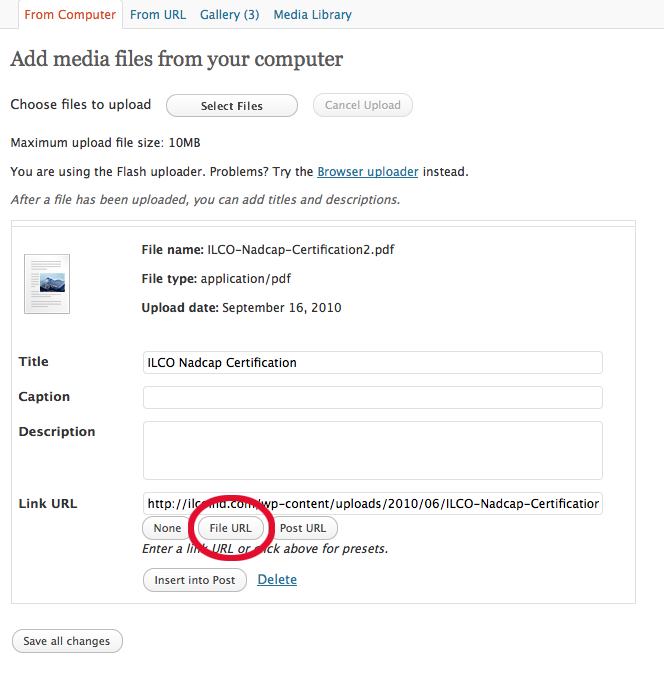
How to Add a PDF File to a WordPress Page that Doesn’t Open an Extra Page

Adding a pdf link to your WordPress page gives a link. But when you hit the link online sometimes a new page opens, usually with a comments box. You then have to press the link again.

Here’s an easy way to avoid that.

  1. Upload/Insert “Add Media”
  2. Find pdf file and either upload it from your computer or locate the file in your “Media Library”
  3. Click “Show”
  4. Where it says “Link URL” hit the button that says “File URL”
  5. Insert into Post

Hit the "File URL" Button

You will then have a link. Hitting the link will either bring up a dialog box asking to open or download the file or will do either of those depending on your browser’s preferences.

Computer Tech Support Helpful Hints Software Technology Website Design
13 Sep

Blog your way to Business Success

Blogging is a great way to promote your business

One of the most popular parts of the new Web 2.0 or Social Media is blogging. Using the format of blogging to help promote your business is a powerful way to reach new clients. The whole purpose of writing a blog is to constantly create new content. All search engines, such as Google, Yahoo and Bing, love blogs because they pick up on the new content, especially if it is optimized correctly. This is a great way for your blog to be listed high up in search results.

Blogging Tips

How does this relate to your business and it’s success? Just follow these simple steps:

  • Create content that people want to read. You want to be a useful resource, so make sure whatever you’re writing about is something people will learn from.
  • Include keywords, but make sure the copy is easy to read, short, to the point and useful.
  • Bulleted items and lists are very helpful for those who skim.
  • Make sure to include a link to your website (unless your blog is your website). Don’t include too may links to your website as search engines may interpret that as spam and reject your site.
  • If you do link to your website, it’s best to link to a specific “landing page” that covers the topic of your blog.

Why not write a new blog post every day?! It’s a great new habit that will pay you back with more people interested in your business. It doesn’t have to be very long. Just interesting.

Want more information? Call Chuck at 310-791-5803.

Blogging to promote business. Branding Business Practices Helpful Hints Search Engine Optimization (SEO)
08 Sep

Take Control of Your Website

Are you a New or Small Business Owner?

Smart Preservation

Smart Preservation

Then you really need to get a website. Let the world know you exist.

The question is, where do you start?

Start your own blog/website.

WordPress is a Content Management System (CMS). It has a completely accessible back end that is easy to learn. You will be able to add an unlimited number of pages, posts and plugins with unbelievable functionality. This includes photo galleries, PayPal shopping carts, Twitter and Facebook links, calendars, search engine optimization and tons more.

Market your business by adding content

Search engines love it when you add new content to your website. So do readers. Adding useful content to your site on a regular basis is a great way to increase your Google page rank.

Starting your company blog also helps to connect you with potential and current clients. It’s a way for you to be creative too.

Custom Designed Templates

Stand out from the crowd. There are plenty of free WordPress templates available. But you want your website to be unique.

It’s easy to get your own company website.

I can design your custom template and set up your entire site.

Many options are available:

  • Domain name and hosting. I am an authorized GoDaddy affiliate.
  • Quick lessons on how to access your Admin page and make changes yourself.
  • Search Engine Optimization. Includes Title Tags, Meta Description, Keywords and Registration with major search engines like Google and Bing.
  • Widget setup. I’ll install the most popular and useful plugins to meet your individual needs.
  • Backup and maintenance available. Keep all your plugins and WP operating system up to date and your files backed up online. You can also get a regular backup of your files emailed or sent to you on disk.

Call Chuck at 310-791-5803 for more information and prices.

I will design and set up your unique website that will meet your budget. Special package deals available upon request.

Advertising Branding Website Design
01 Sep

10 Reasons an iPhone 4 is a Great Business Tool

Having used a Mac since desktop publishing took over the graphic design industry I am a big fan of all things Apple. I consider my iPhone more as a mini-computer than a phone because it’s so versatile.

These are just some of my favorite business related apps. If you’re on the go a lot, an iPhone is a great way to keep productive. It’s also great while sitting on the sofa in front of the TV.

  1. E-mail: The iPhone syncs with your iCal and MobileMe account seamlessly.
  2. Facebook: Stay in touch with all your friends and clients.
  3. Twitter: Set up your favorite list and keep up to date.
  4. Bam Analytics: Set up your Google analytics and keep track of how your websites are doing wherever you are.
  5. Lynda.com: If you have a spare moment you can watch a video lesson on the latest software applications. Check out a FreePass today.
  6. iBooks: A great way to catch up on your business reading. Even load up your own pdf files and e-books to keep up to date.
  7. Go Daddy: Find and purchase a domain name or check your mobile mail.
  8. Lucy Phone: Never wait on hold again. Find a company, call it up, and your phone will ring you when the call goes through.
  9. NetNewsWire: Keep up with the latest news feeds. Syncs with Google Reader. It’s my favorite news reader as it is quick and there’s a convenient Mac app too. Great on the iPad and iPhone.
  10. Instapaper: Save a web page or newsfeed and read it later in Instapaper. A great way to catch up when you have a spare moment.

There are many more useful business related iPhone and iPad apps, but these are my favorite, so far. What are yours?

Business Practices Helpful Hints iPad iPhone

Follow Us

Facebooktwitterpinterestlinkedin

Click Image for Professional Logos Starting at $75

Creative Logos

Shop Amazon

Creative Juices Graphic Design Studio | Copyright © 2026 All Rights Reserved